
Introduction to News & Release Widgets
Overview of how the Widget works
The News & Release Widget in Widgion allows you to share product updates, announcements, and important information directly with your users. Instead of requiring users to leave your support experience to find the latest information, you can make your news and releases available directly within your widget.
The News section gives you a central place to create, manage, and organize your updates. You can create new articles manually or use Write with AI to help draft your content, then manage your updates from a single dashboard.
Managing Your News
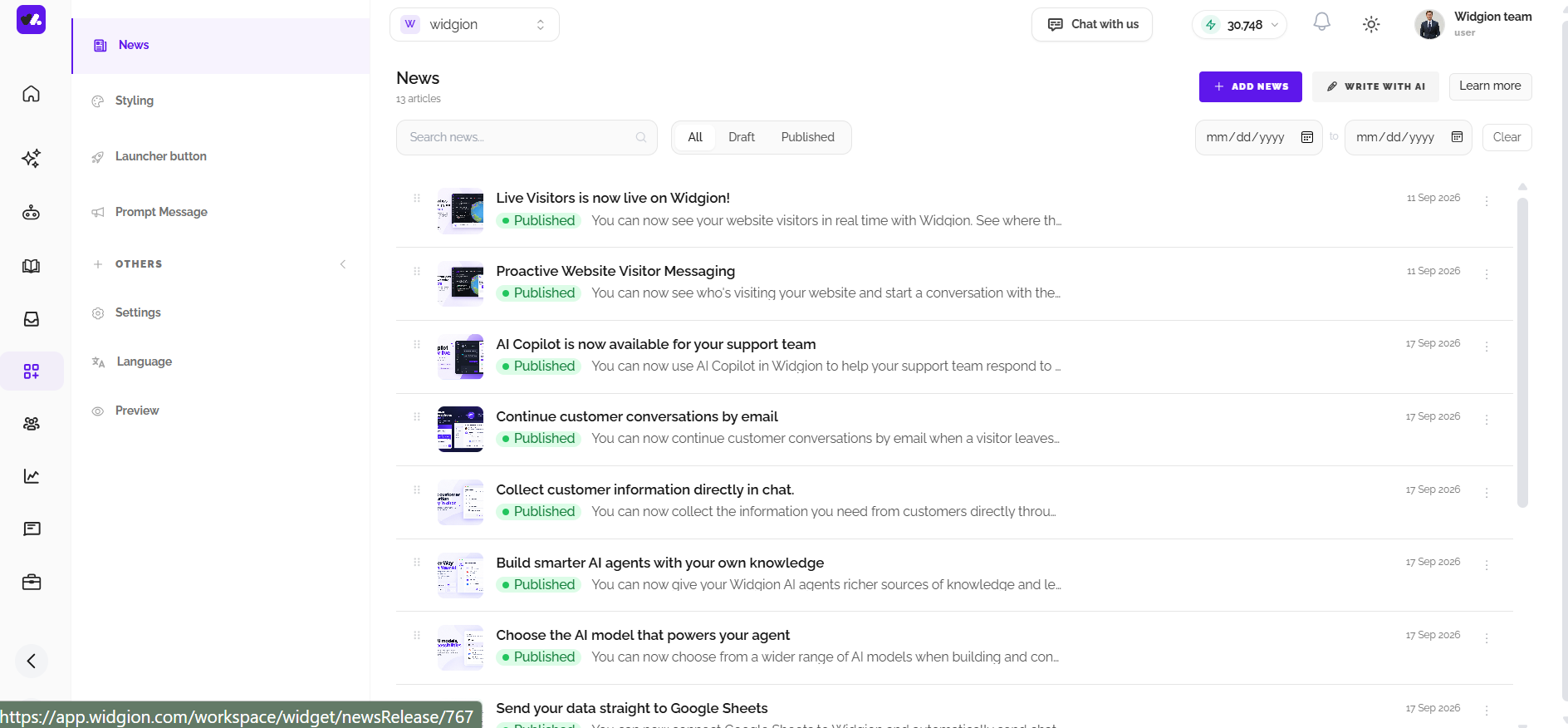
The News section provides an overview of all the updates you have created. Each article displays its title, publication status, and date, making it easy to keep track of what has been published and what is still being prepared.
You can use the search field to find a specific update and filter your articles by All, Draft, or Published. A date range filter is also available when you need to narrow down your updates to a specific period.
Creating News & Release Updates
To create a new update, select Add News from the News dashboard. You can create an announcement, product update, or release and prepare it for publication from within Widgion.
If you want help creating your content, Write with AI provides an alternative way to draft your update. This makes it easier to turn product changes and announcements into clear content that is ready to share with your users.
Publishing Your Updates
Once your news update is ready, you can publish it so users can access it through your connected News & Release experience. Published updates are clearly marked in the News dashboard, making it easy to distinguish them from content that is still in draft.
As you continue publishing updates, the News section becomes a central place for keeping users informed about changes to your product. Your latest announcements can be surfaced directly within the support experience, allowing users to discover important information while interacting with your product.
Keeping Your News Organized
As your collection of updates grows, the News dashboard gives you several ways to keep everything organized. Search, status filters, and date filtering make it easier to find specific articles without having to go through the entire list.
You can also manage individual updates directly from the News list using the available actions. This gives you a simple way to maintain your release content and keep your published and draft updates organized.
Keeping Users Informed
The News & Release Widget gives you a dedicated space for communicating what is happening with your product. By sharing announcements and product updates directly within your support experience, users can stay informed without having to search elsewhere for the latest information.
Whether you're announcing a new feature, sharing a product change, or publishing an important update, keeping your News section current helps users stay connected to your product and its ongoing development.
Keeping Your News Up to Date
Your News & Release content works best when it reflects the latest changes to your product. Use the News dashboard to regularly review your published updates, manage drafts, and add new announcements as your product evolves.
With tools for creating, searching, filtering, and managing updates in one place, Widgion makes it easier to maintain a consistent flow of product communication and keep your users informed.
Did this answer your question?
What was missing or unclear?
Thank you for your feedback!
Your input helps us make this article better.
Still need help?
Contact support →Related articles
Introduction to Knowledgebase Widget
Overview of how the widget works.
Introduction to FAQ Widget
Overview of how the widget works
Adding, Editing, and Managing Contact Data
Handles actions like adding contacts, editing details, deleting, and exporting.
Understanding Contact Types (Users, Guests, and Custom Lists)
Explains the difference between Users, Guests, and Custom Lists, and how each is used within the platform.
On this page